What does 7-Zip do?
7-Zip Latest Version For Windows is a free, open-source file compression tool for Windows. It helps you reduce file sizes and extract compressed archives quickly. The software supports multiple formats, including ZIP, RAR, TAR, and its own 7z format. Both regular and portable versions are available in this release.
This program is ideal for anyone who needs to compress large files or manage archive files. The portable version runs without installation, making it perfect for USB drives. 7-Zip offers strong AES-256 encryption to protect your compressed files. It integrates directly into Windows Explorer for easy access.
Version 25.01 Final brings improved stability and updated compression algorithms. The software remains lightweight and uses minimal system resources. Whether you’re sharing files online or backing up data, 7-Zip provides reliable compression without cost.
The Problem It Solves
Large files take up too much storage space on your computer. They’re also slow to upload or send via email. Many email services won’t accept attachments larger than 25MB. When you download compressed files from the internet, you need special software to open them. Different archive formats like ZIP, RAR, or TAR require different tools to extract.
Why Users Need This Software
7-Zip solves these common issues. It compresses your files into smaller sizes, often reducing them by 50% or more. This saves disk space and makes file sharing faster. You can compress an entire folder of documents or photos into one small file. The software opens almost any compressed file format you encounter online.
Real Use Cases
Students can compress assignment folders before uploading them to school portals. Photographers can reduce image collections for easier sharing with clients. Office workers can archive old project files to free up storage. The portable version works from a USB drive without requiring installation permissions. This is helpful on work computers where you can’t install software.
Practical Benefits
The software is completely free with no hidden costs or premium versions. It uses AES-256 encryption to password-protect sensitive files. This keeps your personal documents safe during file sharing. The compression is fast and works quietly in the background. You can right-click any file in Windows and compress it instantly. The interface is straightforward, even for people who aren’t tech-savvy.
When You’ll Use It
You’ll need 7-Zip when sending multiple files to someone via email. It’s essential for downloading software packages that come in RAR or 7z format. Backing up important documents becomes easier when they’re compressed into single archives. If you’re running low on hard drive space, compressing old files helps immediately. The portable version is perfect for IT professionals who work on different computers daily.
What Makes 7-Zip a Popular Optimization Tool?
High Compression Ratio for Smaller Files
7-Zip compresses your files better than most other programs. The software uses its own 7z format to make files much smaller than regular ZIP compression. You can save up to 30-70% more space compared to standard compression tools. This means you can fit more files on your USB drive or send them faster through email.
The program works with documents, photos, videos, and any other file type you need to compress. Your computer finishes the compression quickly, even when you work with large folders containing hundreds of files.
Support for Multiple Archive Formats
This program opens and creates many different types of compressed files. You can work with ZIP, RAR, TAR, GZIP, and over 20 other archive formats without installing extra software. The software extracts files from any compressed folder you download from the internet.
You can also create new archives in several popular formats that work on Windows, Mac, and Linux computers. This flexibility saves you time because you don’t need different programs for different file types. The program handles password-protected archives from other compression tools without any problems.
Strong File Encryption for Security
7-Zip protects your private files with powerful AES-256 encryption. You can add a password to any compressed file to keep others from opening it without permission. The encryption method is the same one that banks and government agencies trust for their sensitive data.
Nobody can access your files even if they steal your USB drive or intercept your email attachments. The software encrypts both the file contents and the file names inside the archive. You simply type your password when creating the archive, and only people with that password can open it later.
Portable Version Runs Without Installation
Download 7-Zip 25.01 for Windows, works directly from any folder or USB drive. You don’t need administrator rights or permission to install software on the computer. This feature helps students, office workers, and anyone using shared or restricted computers.
You can carry the program on your flash drive and use it on any Windows computer you encounter. The portable version includes all the same features as the regular installed version. Your settings and preferences stay with the program folder, so everything works exactly how you configured it.
Windows Explorer Integration for Quick Access
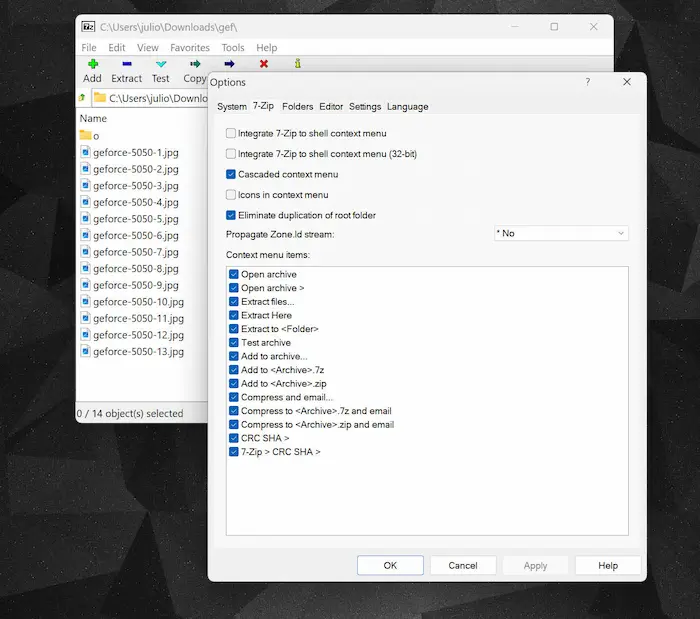
The software adds helpful options directly to your right-click menu in Windows. You can compress any file or folder by simply right-clicking it and choosing a compression option. The program also lets you extract archives the same way, without opening the main application window.
This integration makes your daily work faster because you skip extra steps and clicks. You can compress files, extract archives, or check archive contents right from File Explorer. The context menu options appear for all file types, giving you instant access to compression tools whenever you need them.
File Manager Built Into the Program
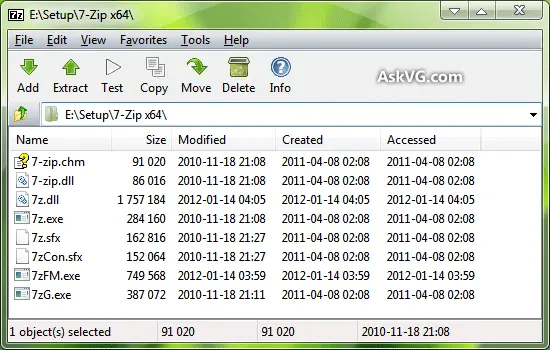
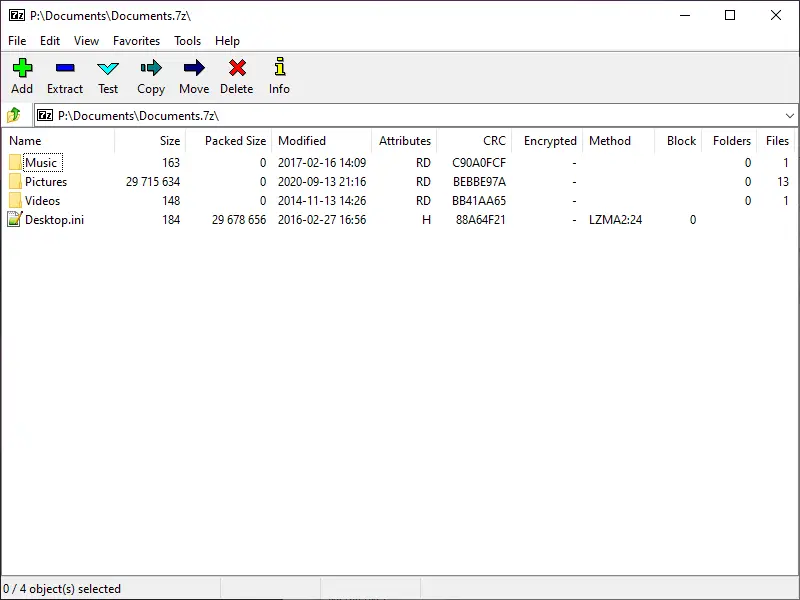
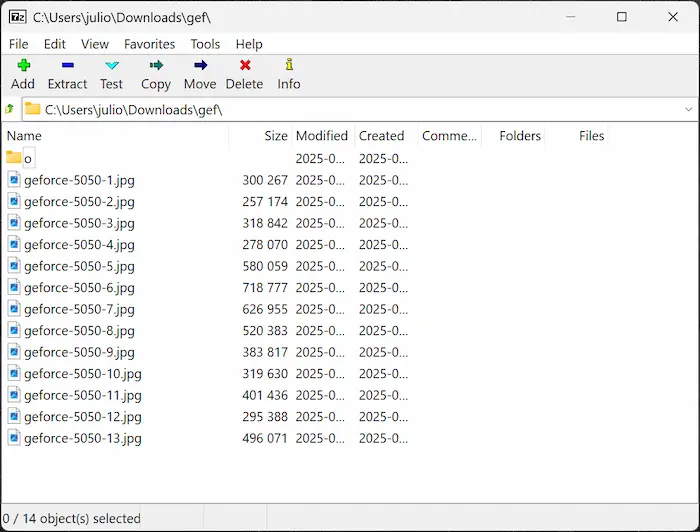
7 zip 25.01 final portable download windows 10, includes its own file browser that helps you manage files and archives together. The built-in manager lets you view the contents of compressed files before extracting them. You can open multiple archive windows at once and drag files between them easily.
The interface shows file sizes, dates, and other details in a clear table format. You can test archives to check if they’re damaged or corrupted before extracting important files. The file manager also lets you update existing archives by adding new files or removing old ones without recreating the whole archive.
Command Line Tools for Advanced Users
The program provides command line options for people who work with scripts and automation. You can create batch files that compress or extract multiple archives automatically on schedule. System administrators use these commands to backup servers and manage large file operations.
The command line version works great for tasks you need to repeat regularly without manual clicking. You can combine 7-Zip commands with other programs to build custom file management workflows. The syntax stays simple and easy to learn, even if you’ve never used command line tools before.
Completely Free and Open Source Software
7-Zip costs nothing to download, install, and use forever. The developers release the source code publicly, which means anyone can check how the program works. You never pay subscription fees, upgrade charges, or hidden costs for premium features.
The software receives regular updates that fix bugs and improve performance without asking for money. Programmers around the world contribute to making 7-Zip better and more secure over time. You can use the program at home, school, or work without buying licenses or worrying about trial periods ending.
ScreenShots of 7-Zip
System Requirements
- Operating System: Windows 11, Windows 10, Windows 8, Windows 7, Windows Vista, Windows XP (32-bit and 64-bit versions supported)
- Processor: Any Intel or AMD processor (1 GHz or faster recommended)
- RAM: 512 MB minimum (1 GB or more recommended for better performance)
- Hard Disk Space: 5 MB for installation (additional space needed for compressed files)
- Display: Any screen resolution supported by Windows
- Additional Requirements: No special hardware or graphics card needed
- Internet Connection: Not required for software operation (only needed for downloading)
Technical Details
- Software Name: 7-Zip 25.01 Final + Portable
- Version: 25.01 (Latest stable release)
- File Size: Approximately 1.5 MB (32-bit) / 1.8 MB (64-bit)
- License Type: Free and Open Source (GNU LGPL license)
- Developer: Igor Pavlov
- Language Support: Multiple languages including English, Spanish, French, German, and 87 others
- File Formats Supported: 7z, ZIP, RAR, TAR, GZIP, BZIP2, XZ, WIM, ARJ, CAB, CHM, CPIO, DEB, DMG, FAT, HFS, ISO, LZH, LZMA, MBR, MSI, NSIS, NTFS, RPM, UDF, VHD, WIM, XAR, Z
- Compression Ratio: Up to 10% better than standard ZIP format
- Encryption Method: AES-256 for password protection
- Interface: Graphical User Interface (GUI) and Command Line Interface (CLI)
- Installation Type: Regular installer and portable version available
Related This:
- IsoBuster Pro: Recover Data from CDs, DVDs, and Blu-ray
- Cacheman 10.70.0.4+ Portable Free Download
- LibreOffice: Open-Source Tools for Professionals
How To Download And Install?
- Click the download link for your Windows version (32-bit or 64-bit).
- Save the installer file to your computer and double-click it to start the installation process.
- Click “Install” in the setup window and wait a few seconds for the program to install on your computer.
- Once installation completes, click “Finish” and you can start using 7-Zip immediately from your right-click menu.
- For the portable version, simply extract the downloaded ZIP file to any folder or USB drive and run the 7zFM.exe file.
- No restart is required, and the program integrates automatically with Windows Explorer for easy file compression.
- Enter the correct password when prompted, and the software will extract the protected files for you.
FAQs
Yes, 7-Zip is completely safe and trusted by millions of users worldwide. It’s open-source software with no viruses, malware, or hidden programs that could harm your computer.
Yes, 7-Zip can open password-protected archives from any compression program. Simply enter the correct password when prompted, and the software will extract the protected files for you.
The Final version installs on your computer like regular software, while the Portable version runs from any folder or USB drive without installation. Both versions have identical features and compression capabilities.
Right-click the RAR file, hover over “7-Zip” in the menu, and select “Extract Here” or “Extract to folder name.” The files will extract to your chosen location instantly.